
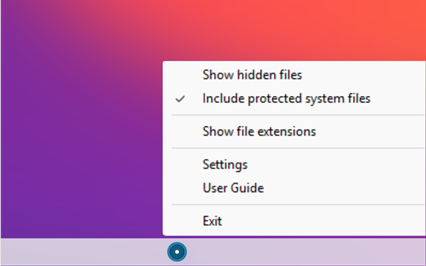
AltDot is located in the system tray. Right-clicking the icon displays the menu options.
SHOW HIDDEN FILES
This option appears when hidden files are not visible, and selecting it will make them visible.
HIDE HIDDEN FILES
This option appears when hidden files are visible, and selecting it will hide them.
INCLUDE PROTECTED SYSTEM FILES
When hidden files are visible, protected system files may or may not be shown depending on the selection made here.
SHOW FILE EXTENSIONS
This option appears when file extensions are not visible, and selecting it will make them visible.
HIDE FILE EXTENSIONS
This option appears when file extensions are visible, and selecting it will hide them.
TOGGLE
In addition to changing the visibility of hidden files and file extensions using the mouse, the following hotkeys are available:
 Toggle hidden files
 Toggle file extensions
SETTINGS
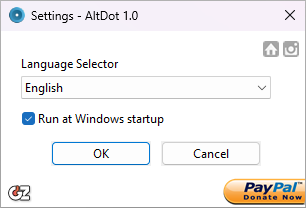
In this window, you can select the language for AltDot.
You can also choose whether AltDot runs at Windows startup.
There are links to the GDZ Software website, the AltDot website, and to PayPal for making a
donation.
Select the OK button to save the changes, or Cancel to discard them.
USER GUIDE
This user guide.
EXIT
Exit AltDot.